Passkeys (passwordless logins)
After a longer break from posting, due to being too busy with other things, I hope to post more regularly the next weeks/months. Starting with this Passkeys intro, where I’ve summarized Passkeys and their advantages & disadvantages for you.
How Passkeys work
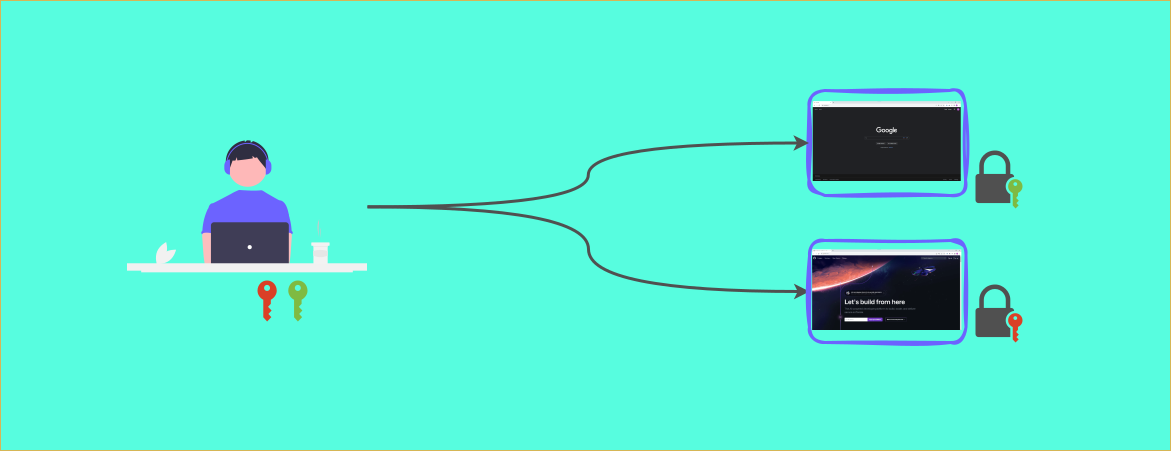
If you have never heard of Passkeys before, Google has a quite brief video that really gives a good first idea of them: Understand passkeys in 4 minutes. So to summarize the basic mechanism, also shown in the figure below:
- Instead of a Password a public/private key pair is generated during registration
- The public key is stored at the Website you want to use, the private key on your device

This will probably sound very familiar at least for the developers among us, since using SSH keys to connect to remote servers or for git is something we do often. So what is the buzz all about? The “real” gamechanger with Passkeys is that the mechanism now becomes more convenient and user friendly. What do I mean with that?
- No technical skills (or CLI knowledge) are required to set Passkeys up, you never actually see the keys
- It is considered that the keys are intended to be synced across devices (like with a Password Manager), so you can use the same logins on all you devices
- It is even possible to share single logins with other local devices where you want to login (like a work computer or your friends tablet) by scanning a QR code.
So Passkeys are kind of SSH keypairs on steroids. For a better overview you find both sharing mechanisms illustrated in the next figure.

The advantages of Passkeys
The advantages mainly come down to two factors: increased security and increased comfort. Let us look at both factors.
Security
- Biometric protection: Passkeys are intended to be used together with the biometric locking mechanism of your device, this makes sense to me but also seems like something different synchronization providers do differently.
- Secure sharing: To improve the security of the local device sharing workflow, the devices communicate locally e.g. via Bluetooth to make sure this mechanism cannot be exploited remotely.
- Secure foundation: The Private/Public-Key Cryptography is considered a secure access procedure, given an appropriate implementation (long enough keys, secure handling of private keys, …).
- No Phishing possible: Since there is no password, nobody can trick you into typing it to a cloned website. Also the browser automatically detects which key belongs to which website so that it also never tries to authenticate to a wrong website.
- No data breaches: There is no password or private key on any vendors website server, so that nobody can steal them. It should be mentioned though that there are also other protection methods against data breaches like using salt (& pepper 🙃) for hashing the saved passwords properly. Also not using the same passwords on several websites definitely minimizes the consequences of being part of a data breach or using two factor authentication.
- No unsafe passwords possible: The biggest security weakness is still that we are all humans and even if you are using a password manager you might carry some weak passwords in it (looking at you Pa$$w0rd), which you choose many years ago and never updated. Passkeys eliminate this possibility completely, but I’m asking myself whether updating keys in the future as longer keys are recommended is part of the standard → probably yes.
Comfort
- More comfortable than password & 2FA: This is the main selling point for users that Passkeys provide the same amount of protection against unauthorized logins (maybe even a bit more) as a password plus two-factor authentication enabled, while being more comfortable to handle.
- You cannot forget them: Since there is no password to remember you cannot forget it and sign yourself out forever (or until password reset).
- Synchronized by default: Passkeys will always come with support for syncing the across devices since you simply cannot reasonably transfer them otherwise (you could type if the would be displayed…but nobody really wants to type a few hundred characters i guess).
While the list of comfort and especially security advantages seems very impressing, I want to mention that you get a lot of them with a Password manager that you use properly already. They main points remaining are: Secure sharing (talking about the local variant), No data breaches and slightly more comfort at least compared to enabled two factor authentication.
The disadvantages of Passkeys
- Single Point of Failure: There is still a single point of failure, like with a password manager. It might not be very likely that your Passkey synchronization provider is breached, but if it happens the damage would be very big because all your logins are collected there.
- Less choice: You don’t have a choice to use a password manager or not for single logins, if in the future someday only Passkeys would be supported.
- You need it on every device or at least the device needs to support the sharing mechanism. This seems to be a bit of a problem at least at the moment, when we think of Cars, TVs or some other IoT devices that could require one of your logins.
- You can not spare single important logins from getting in your Passkeys Sync. I for example don’t keep my Email (for password resets) and bank account passwords in the Password Manager. That leads me to three Passwords I have to remember, which is easy to do even if they are strong and mitigates the risk of somebody getting access to my Password Manager.
- New procedure: While the underlying base technology is battle tested, the whole procedure that Passkeys introduce might (like the local device sharing mechanism) might have some other vulnerabilities that are just not discovered yet. To draw an analogy, nobody knew about Phishing before websites with password logins were a thing.
So Passkeys are like everything else in tech (or life…): you don’t get it for free. I still think the advantages outweigh the disadvantages and that Passkeys are a good idea.
Further Resources
- Overview of Sites that support Passkeys: https://passkeys.directory/
- Another good video: What are Passkeys? | Are Passwords Dead? | A Security Expert Explains
Conclusion/TLDR
I think that:
- Passkeys are the Evolution of the Password Manager
- Likely will be the default login mechanism someday in the future, since tech giants start pushing them and they solve some adoption issues of password managers by providing more default mechanisms, comfort and come built-in, e.g., with Chrome. Due to the omnipresence of passwords today, it will take some time for sure before anybody thinks about retiring them.
- You should give them a try if you are interested in the topic.
What do you think about Passkeys? Feel free to let me know! 🙂